I Tested 3Unlocker and Here Are My Findings

Is 3Unlocker a legitimate service? Does it work when unlocking iOS locks? In this 3Unlocker review, you’ll find what 3Unlocker can do and its limitations.
It can be frustrating to end up with a locked second-hand iPhone or iPad. Fortunately, iOS unlocking tools like 3Unlocker claim to help you regain access to your device.
In this 3Unlocker review, I’ll share my experience unlocking second-hand iOS devices, highlight its key advantages and limitations, and point out important things you should know before using it.
What Is 3Unlocker?
To start with, here’s the key point: 3Unlocker is not a standalone product. Instead, it refers to a set of iOS unlocking features built into 3uTools.
Thus, don’t navigate to 3unlocker.com. It will redirect to unlockmaker.com, and this does nothing with 3Unlocker.
While you may find 3Unlocker download links on third-party websites, it is generally safer to use the built-in unlocking features directly within 3uTools.
What Can You Do with 3Unlocker?
- Remove Screen passcodes, such as 4‑digit or 6‑digit PINs, alphanumeric codes, and complex patterns on iPhones and iPads.
- Bypass iCloud Activation Lock screen when you’re using a second‑hand device or are stuck at the iCloud Activation Lock screen.
- Claim to work on recent iPhones and iPads.
More Facts About 3Unlocker
Although it’s free to use, 3Unlocker has the following limitations.
- You need to download it from third-party sites, as it doesn’t have an official website.
- Lacking an official website and downloading it from unverified sites also means that it might come with fake ads, surveys, and potential malware.
- It’s not as trustworthy as other iOS Unlockers, as it often gets stuck during the unlocking process.
- It’s not that compatible with newer Apple models and iOS versions.
- You might need to jailbreak your device, which can potentially expose security vulnerabilities.
- You may experience data loss after unlocking your device.
Does 3Unlocker Really Work?
In the following sections, I’ll test it on my iPhones and iPads to see whether it’s as workable as it advertises.
Considering the download links and installers from other third-party forums might carry fake ads or even malware, I got the 3Unlocker downloading link from a reliable forum I used to use.


In contrast, 3uTools is the more legitimate option. You can download 3uTools directly from its official website and access the built-in unlocking features within the software.
On the other hand, if you are considering 3Unlocker, you should be cautious and only rely on trusted sources, as third-party download sites may not be reliable or safe.
Unlock Screen Passcode
After installing 3Unlocker on my Windows computer, I connected my iPhone to the computer via a USB cable.
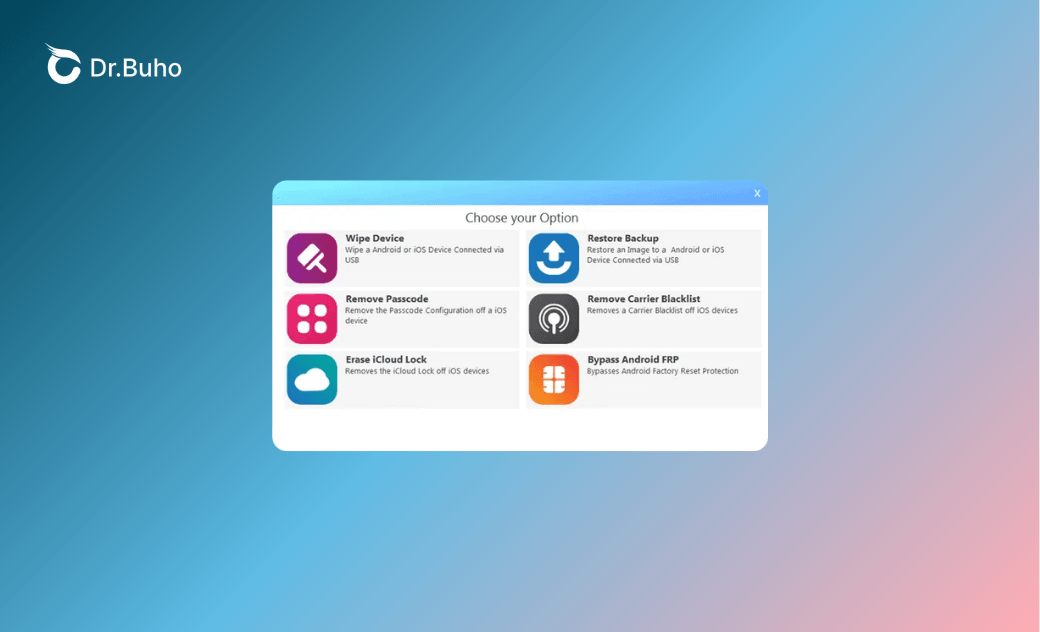
Then I clicked the “Remove Passcode” mode from the main interface. Then I followed the on-screen instructions to enter the recovery mode and download the firmware package that matched my device.


Then I tested the feature on newer iOS versions, like iOS 26. It was not supported as I had expected. It was stuck on the unlocking process, and I had to use other methods to start from scratch.
Despite the low success rate of unlocking a disabled iOS device, the specific steps were also slightly different from other iOS unlocking tools. Overall, the experience of using 3Unlocker to remove the screen passcode was not smooth or convenient.
More importantly, when I ran into issues, I was unable to get timely support. To resolve the problem, I ultimately had to switch to another iOS unlocking tool.
Bypass iCloud Activation Lock
Inside 3uTools, there wasn’t a button to bypass the iCloud Activation Lock. However, it updated the iCloud Activation Lock removal feature in 3Unlocker.
From the main interface, I chose the “Erase iCloud Lock” mode. After I connected the device to the computer, it automatically detected my device.


Then I sent 3Unlocker to my iPhone by clicking on “Upload”. I tried this step three times, and many users have also reported getting stuck at this stage.
When the uploading was completed, I started the setup process to bypass the iCloud Activation Lock screen.
Again, it only worked on older iOS versions and Apple models. As it was advertised, it covered iOS 7 through iOS 17 across iPhones, iPads, iPods, and Apple Watches.
However, after several rounds of tests, I found it failed to work on newer Apple models and iOS versions, such as iPhone 7, 8, X, XS, and 11 on iOS 16-17.
Besides, whether you could use 3Unlocker depends on whether you install the software from a reliable source.
Besides, you’ll be stuck on the iCloud Activation Unlock screen if you perform a factory reset afterwards. This means that it’s temporarily bypassing the iCloud lock instead of fully erasing it.
Remove MDM Profile
3Unlocker didn’t offer a special mode to bypass or remove the MDM profile. However, 3uTools can bypass MDM. Then I tested how to remove the MDM profile using 3uTools
I opened the Toolbox menu and selected “Skip MDM Lock.” The idea was to temporarily bypass the MDM restriction using 3Unlocker.
By following the on-screen prompts, I tapped on “Skip Now” and “Deactivate.” Then, 3Unlocker put my device into the corresponding mode and temporarily removed the MDM lock.


Again, it wiped my device, and all the data was gone. Then I perform a factory reset on my iPhone.
The MDM profile reappeared, which indicates that this is not a permanent solution for removing the MDM restriction.
I also tested the feature on both older and newer iOS versions. Again, it failed to remove MDM profiles on newer iOS versions and newer Apple models like the iPhone 11.
It worked fine at the beginning, but it could get stuck during the firmware installation process.
This was likely because it did not support the latest firmware packages for newer Apple devices and iOS versions.
As a result, I had to try alternative MDM‑removal software after 3uTools failed.
What I Found After Testing 3Unlocker?
Again, I’ll show you the conclusion first: it’s not recommended to use 3Unlocker as an iOS unlocking tool. It feels more like a fragile workaround than a reliable iOS unlocking toolkit.
Here are the reasons in terms of my first-hand experience:
- It doesn’t offer an official website to download 3Unlocker. It’s not safe to install it from third-party sites or unreliable forums.
- It might work successfully only on older Apple models and iOS versions, instead of the recent ones.
- The software often gets my device stuck at the "Uploading 3Unlocker to device" screen. To get out of the dilemma, I had to try another iOS unlocking tool.
- The unlocking features are quite limited. 3Unlocker mainly focuses on screen passcode removal and iCloud Activation Lock bypass, and it even includes some basic Android unlocking functions
- The customer support experience is also weak, as I was unable to get timely responses or helpful assistance when I ran into issues.
Although it’s free to use, I personally don’t think it’s worth the risk to rely on an unstable or unreliable tool. In the end, I switched to BuhoUnlocker as an alternative to 3Unlocker.
It’s a much more reliable iOS unlocking tool than 3Unlocker. I can securely unlock the screen passcode, remove Screen Time passcode, unlock Apple ID, and remove MDM profiles across all my iPhone and iPad models.


It is regularly updated and offers a high success rate for unlocking, making it a reliable choice worth purchasing. More importantly, I can always get an on-time and effective response whenever I have any problems with the tool.
Conclusion
In conclusion, I do not recommend using 3Unlocker or relying on the unlocking features within 3uTools. Although they are free, they do not offer the same level of stability or success rate as many other iOS unlocking tools, and you may end up spending time without achieving the desired result.
Instead, it is wiser to choose more reputable paid solutions such as BuhoUnlocker. This professional iOS unlocking tool supports screen lock removal, Apple ID unlocking, Screen Time passcode recovery, and MDM profile handling more stably and reliably.
Jerome is a passionate enthusiast of all things Apple. He is expertise in crafting tech-related articles, with a portfolio of more than 100 articles covering various Apple products like the iPhone, iPad, and Mac.